Introducing K12 Launch Pad
Learning with IAVA just got an exciting update!
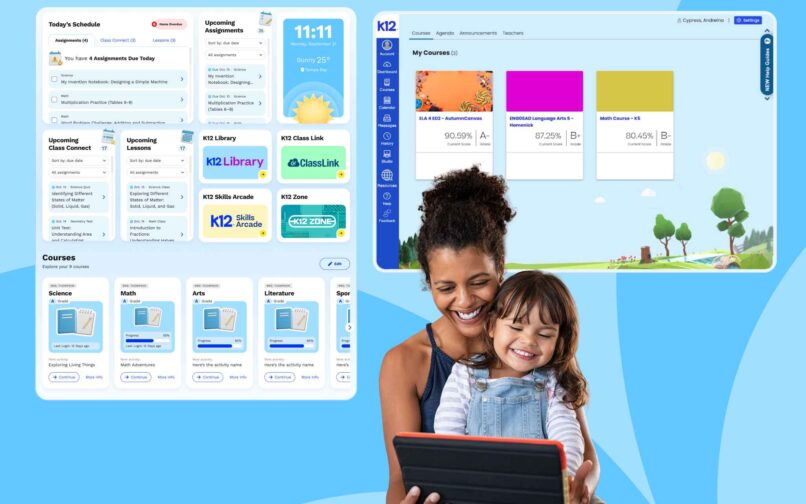
We’re excited to announce that K12 Launch Pad is now live for all IAVA students. This new dashboard is designed to make learning engaging, interactive, and—most importantly—easy to navigate.
What’s New in K12 Launch Pad
When your student logs in through the K12 School (OLS), they’ll automatically land in the new K12 Launch Pad and see some exciting new features! Here’s what to expect:
- Daily Class Schedule View: Shows classes, assignments, and live sessions in one place
- Assignment Tracking: Highlights overdue, due-today, and upcoming tasks
- Upcoming Scheduled Tasks and Events Widgets: Keeps students organized and proactive
- Personalized Widgets: Edit, add, and move widgets on the page to suit learning preferences
- Visual, Age-Appropriate Design: Large text, colorful cards, and iconography for easy navigation
- New Experience for K–5 Students: Colorful, kid-friendly layout featuring the return of Strider
This experience is tailored to your student’s grade level and courses, and you can customize it further for your family’s learning needs.
A New Space to Learn & Grow
K12 Launch Pad is more than just a dashboard—it’s a supportive space designed with your student’s learning journey in mind. These features make online school enjoyable and easy to manage for both students and Learning Coaches.
With these improvements, students can explore and learn with confidence, knowing their experience will be smoother and more engaging than ever.
Have questions? We can help!
For more information on how these new features work, check K12’s FAQ guide. You can also check out the Canvas FAQs for more details on our new K12 School (OLS) platform.
If you have trouble accessing K12 Launch Pad or need extra support, the K12 Help Desk and live support chat are here for you.
Back to BlogRelated Blog Posts

Welcome to the IAVA Blog
We are so excited to have you join us as we launch our blog! Iowa Virtual […]

Flying High – Iowa Virtual Academy grad becomes an...
Earning the rank of Eagle Scout is one of the most prestigious accomplishments that any young […]
Learn Through the Holidays With Winter Quest
Discover fun, free activities that turn the holidays into a season of curiosity, creativity, and growth. […]